Manual duty records during an ELD malfunction
Keep duty records complete during a failure and close the issue with evidence.
What manual fallback records are
Manual fallback records are duty logs kept when an ELD malfunction prevents compliant recording. Reconstructing a log means rebuilding missing days from actual evidence.
For an ELD malfunction, the driver must rebuild today and the previous seven days on paper unless those logs are already available or can be retrieved. Help find the existing records and identify any missing days.
Ensure the driver continues required manual records until the ELD is back in compliance. The carrier’s ordinary repair deadline is eight days from discovery or notification, whichever comes first.
Separate missing records from a failed send
If accurate logs remain visible but transfer fails, help the driver present the compliant display or printout as directed and troubleshoot the send. Do not assume the duty data was lost.
If required records are missing or inaccurate, coordinate reconstruction and manual-recording duties. Use evidence of actual work rather than invented times.
Close the issue after checking recovery
Verify the driver, truck, current status, and new recorded events after repair. Retain the malfunction notice and manual logs. Check that the affected period is accounted for.
If repair needs more time, the carrier follows the FMCSA extension process. More paper logs do not restart the deadline.
Follow an event from start to clear
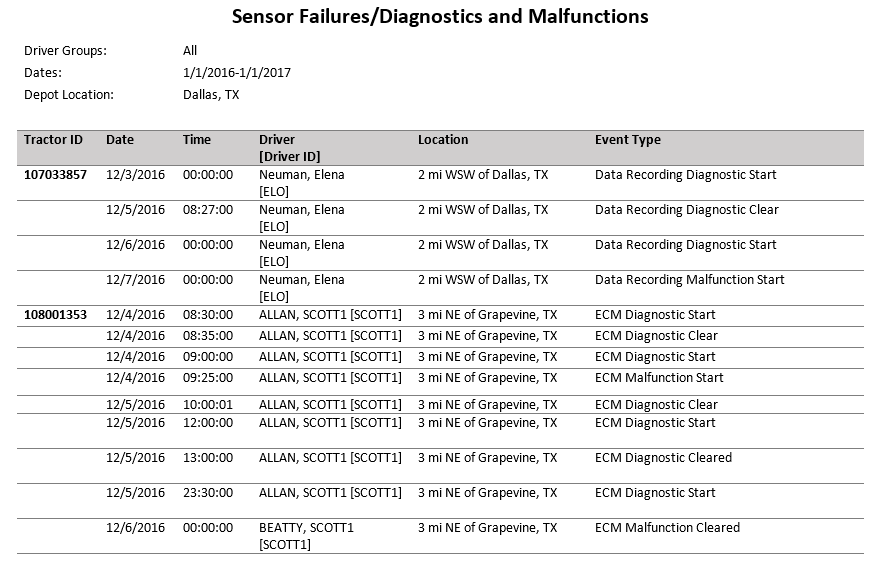
What to check on this screen
- Match tractor, driver, and timestamps to the issue.
- A clear event records a state change. Separately verify any missing duty data and retain fallback logs.
A simple review routine
- Track required fallback days and continued manual records.
- Check the repair deadline and any extension process.
- Verify recording and retain the evidence before closing the issue.