Resolution / The action after the alert
Finding the problem
is only the first step.
Monitoring finds the problem.
Resolution helps do something about it.
ELD Engine works directly with drivers and fleet personnel to prevent violations, resolve active issues, correct log problems, communicate risks, and help keep operations moving.
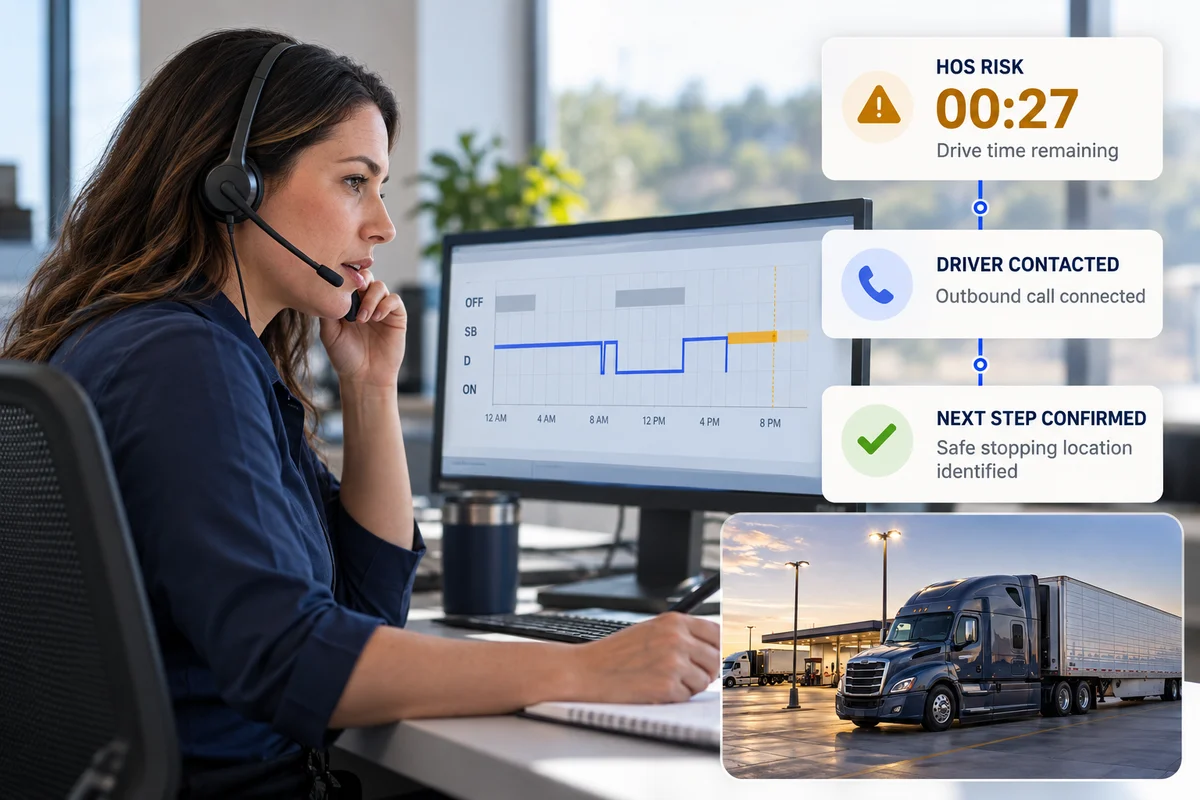
Detect what needs attention.
Take the appropriate action.
Prevent, correct, communicate, or reduce the impact.
A structured response
From detection to action.
Monitoring identifies what requires attention. Resolution determines what should happen next — and carries the response through with the driver, the company, or both.
- 01
Issue detected
A signal needs attention.
- 02
Assess the situation
Understand the context and urgency.
- 03
Contact the right person
Bring in whoever needs to act.
- 04
Take corrective action
Work through the next step.
- 05
Escalate when necessary
Get the company involved.
- 06
Track the outcome
Confirm progress and follow up.
01 / Prevent violations
Reach the driver before the clock reaches zero.
An approaching HOS limit is a reason to start a conversation. We contact the driver before available time runs out, confirm they understand the risk, and check that they have a safe place to stop.
If they have not identified a suitable stopping location, we help them find one. The next step should be clear before the risk becomes an active violation.
The best violation to resolve is the one that never happens.
- 1Outbound callConnected
Confirm awareness of the remaining time.
- 2Safe stopping location confirmed
“I have a place to stop before my time runs out.”
- ✓Risk addressedAction taken
Next step confirmed. Continue monitoring.
02 / Resolve log issues
Get the log back into a complete and accurate state.
A missing detail or inaccurate entry needs context. We contact the driver, confirm what actually occurred, and help complete the record.
- Request missing log details and explain what needs to be completed.
- Request certification, acceptance of unassigned driving, or acceptance of pending edits.
- Correct an incorrectly entered duty status or missing remark when appropriate and permitted.
The record must reflect reality. Corrections complete missing information or correct inaccuracies based on what actually occurred. Accurate records of violations are preserved.
Duty-status remark incomplete
The event is recorded. The supporting detail needs confirmation.
- 1Driver contacted
Ask for the missing information.
- 2Details confirmed
Establish what actually occurred.
- 3Record completed
Add the confirmed remark where permitted.
A complete record, grounded in the actual event.
03 / Get required driver actions
Get the action that only the driver can complete.
Some steps belong to the driver: certifying logs, accepting pending edits or unassigned driving, providing details, confirming an event, or answering an operational question. We actively follow up to get that action completed.
Log certification missing
Explain the outstanding action.
04 / Escalate persistent risks
Know when the company needs to step in.
A single conversation does not resolve every situation. We notify fleet management when drivers remain unresponsive, requested actions stay incomplete, or risky practices keep recurring.
Imminent risks, company approvals, and situations requiring management intervention go to the people with the authority to act.
The right people should know when an issue cannot be resolved at the driver level.
- 1Driver contacted
Explain the issue and request action.
- 2No responseAwaiting driver
Make another contact attempt and continue monitoring.
- 3Company notifiedEscalated
Share the risk, contact attempts, and required next step.
05 / Communicate important risks
Turn monitoring signals into information people can act on.
Give the company the context: what is happening, why it matters, who we have contacted, and what still needs a response or authorization.
From repeated problematic behavior to an unresolved issue or imminent risk, the message should make the next decision easier.
- Driver
- Marcus Reed
- Drive remaining
- 00:24
- Driver contacted
- 14:08
- Response
- No answer
- Risk
- High
- Next action
- Company notified
Company action requested: help reach the driver and confirm a safe stopping plan.
06 / Personal Conveyance management
Manage Personal Conveyance without losing visibility.
From the initial driver request to mileage oversight, we help manage authorized PC usage according to your configured company rules.
Eligible requests can be automatically approved where the process allows it. Requests requiring manual authorization go to the company. After approval, we enable PC and track usage and total mileage.
PC is managed as authorized personal use, not as additional available driving time.
Authorized usage. Mileage visible.
Driver requests PC
Receive the request and its context.
Request reviewed
Evaluate against configured company rules.
Approve where the process permits.
Request authorization and await a decision.
PC enabled
Track usage and total PC mileage.
If approval is not granted, PC is not enabled through this workflow.
07 / Driver & employee support
Give drivers answers when they need them.
Drivers and company employees can contact the team to understand HOS availability, clarify pending log issues, check the status of a resolution, or coordinate the next step.
We answer operational questions and requests with access to the driver's hours, timeline, and outstanding actions.
The answer comes from someone who can see the situation.
08 / Operational guidance
Help the driver understand what is realistically possible.
We help drivers understand what their available time means for the trip. That includes drive and shift time, break requirements, reset timing, estimated travel, and whether an appointment plan appears achievable.
With that context, we can discuss a practical sequence of driving, breaks, or resets — and flag when the current plan needs another look.
Guidance is based on available HOS and trip information. Road conditions, travel time, and changing circumstances still affect arrival.
08:00 tomorrow
- Distance remaining
- 486 mi
- Available drive today
- 03:42
- Reset completes
- 04:10
Recommended next steps
- 1Stop before the current drive limit
Confirm a suitable stopping location.
- 2Complete the required reset
Recheck available hours before departure.
- 3Resume at 04:10, if eligible
Continue toward the appointment and reassess the ETA.
Appointment needs review. A 04:10 restart alone does not establish an 08:00 arrival. Confirm the remaining distance after today's driving and communicate any expected delay.
The complete resolution model
One issue. One clear next action.
The response changes with the situation. The discipline stays the same: understand the issue, involve the right person, act, and follow through.
- 01 / The signal
Monitoring detects
- HOS risk
- Log issue
- Driver or PC request
- Operational risk
- 02 / The context
Resolution assesses
- What happened?
- Who needs to act?
- How urgent is it?
- 03 / The response
Resolution acts
- Call the driver
- Correct inaccurate information
- Request driver action
- Approve or request approval
- Answer or provide guidance
- 04 / When needed
Escalate
- Notify the company
- Request management approval
- Communicate persistent risk
- 05 / Follow through
Track the outcome
- Resolved
- Awaiting driver
- Awaiting company
- Continuing to monitor
An open issue keeps a next step — including when the next action belongs to the driver or the company.
People who act. A process that follows through.
Monitoring tells you what is happening.
Resolution helps change what happens next.
Let ELD Engine handle the calls, follow-ups, log actions, approvals, escalations, and everyday intervention required to keep issues from piling up.
Explore the Monitoring behind every action