01AUTOMATIC CREATION
HOS violation
Drive limit violation becomes active
Task opens with relevant event details
Response and outcome join the timeline
Documentation · structured issue history
ELD Engine creates structured task records for compliance and operational issues, tracks their progress, records important events automatically, and preserves a clear activity timeline from detection through resolution.
More than a task
The task is not just something to complete. It is the audit trail: what happened, what was done, who acted, and how the situation ended.
Each record can hold the details appropriate to its issue type, alongside the history of its progress.
What happened and why the record exists.
Driver, vehicle, time, issue-specific values, and related context.
Supporting material and human context alongside system activity.
See where the issue stands and how it was ultimately resolved.
Changes, decisions, and detected events in the order they happened.
Created as events happen
When the monitoring platform detects certain events, it can create a task and preserve the relevant details as the issue unfolds. Documentation is part of the workflow, not paperwork added later.
For task types configured for automatic creation; coverage depends on the event and workflow.
Automatic activity · Personal Conveyance
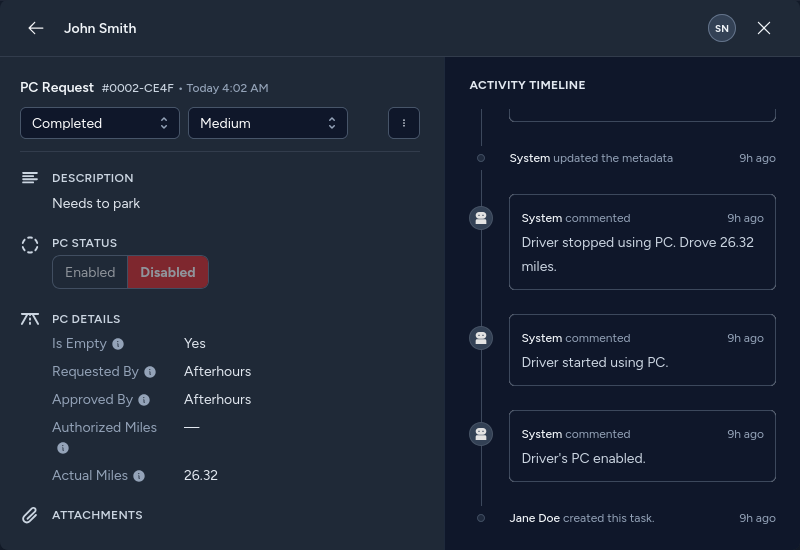
A PC request can store the requested use, approval information, authorized mileage, and actual mileage. When supported, the platform can add activity as PC is enabled, driving starts and stops, and PC is disabled.
Illustrative workflow and values. The product screenshot above shows a real task detail view and its recorded PC activity.
The activity timeline
Instead of rebuilding the story days later from messages, logs, and memory, relevant history is organized chronologically in one place.
A task’s activity may include creation, status changes, human comments, driver contact, detected ELD activity, metadata updates, files, approvals, and resolution events.
In this PC Request example, system comments appear in sequence next to the task’s status and issue-specific details.
People + platform
Telemetry and human judgment each tell part of the story. The task brings both into one usable history.
Automatic task creation
Detected ELD and vehicle activity
Field changes and status updates
Automatic resolution events
Driver requests and explanations
Phone-call outcomes
Management decisions
Files and manual resolution notes
Automatic resolution
For supported workflows, task status can follow the real state of the issue. When the system detects that the underlying problem is corrected, it can add the event and close the task.
That reduces manual cleanup and keeps status meaningful. Automatic closure applies to certain task types when their resolution condition is detected.
Product evidence
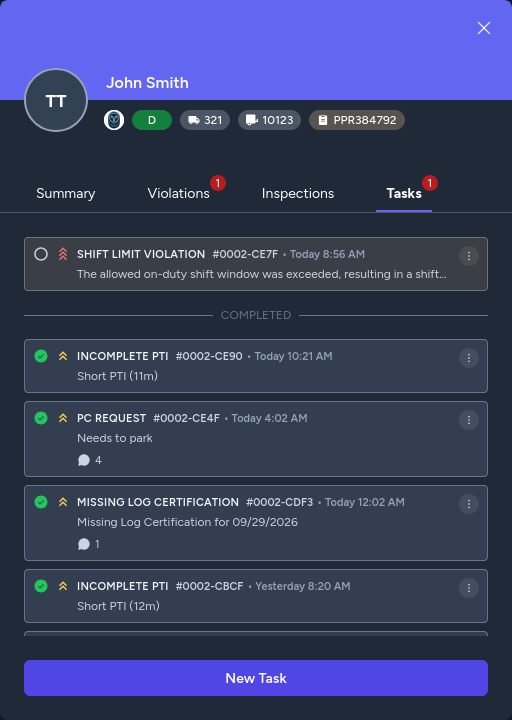
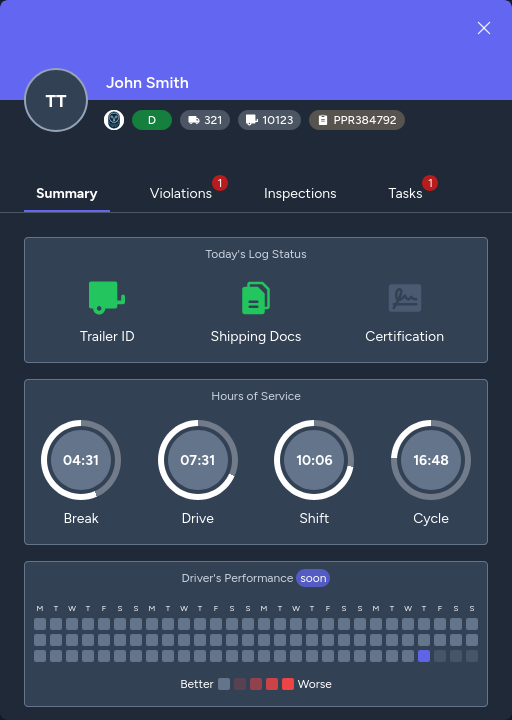
A task is part of a wider driver history. Find the issue in context, open the record, and review its details and activity.
One framework, many workflows
The task structure adapts to compliance and operational situations, from automatically detected events to human-reported problems.
Why the record matters
See what happened and when, without piecing together separate sources.
Understand what actions were taken and what still needs attention.
Handle recurring issue types through structured workflows.
Automatically record the events the platform can detect.
Open one task to see the relevant history in context.
Keep the issue history available after the immediate response is over.
Issue coverage
A sampling of compliance and operational task types the framework can support.
Break, drive, shift, and cycle limit violations · Missing certification · Shipping documents · Trailer ID · Pre-trip inspection · Log optimization
Unassigned driving · Driving without ELD · Disconnected ELD device
DOT inspection
Personal Conveyance and Yard Move · Authorized and unauthorized activity
Problem report · Other
The ELD Engine service loop
Monitoring detects. Resolution handles the response. Documentation preserves the full record—and can begin updating automatically as events occur.
Structured history, from signal to resolution
ELD Engine can create, track, and update documentation tasks automatically, while your team adds the human context that makes the record useful.