24/7 fleet monitoring
Monitor every driver.
Catch risk early.
Act before it becomes a problem.
ELD Engine continuously monitors driver hours, logs, vehicle activity, inspections, fuel events, and other operational signals — then prioritizes what your compliance team needs to look at first.
Your ELD data. Our technology. An expert team watching.
01 See the current situation
02 Find the next risk
03 Focus human attention
01 / Live HOS
Know who is running out of time.
A clock tells you what is left. Monitoring helps your team understand what a driver can realistically do next — and when they can move again.
- Break, drive, shift, and cycle time remaining
- Current HOS violations and the previous 7 days
- Break timing, estimated range, and reset availability
Driver availability
Marcus Reed Driving
Drive
01:24
remainingShift
03:12
remainingCycle
11:45
remainingUntil break
00:42
remaining Break required in 42 minutes.
Review the next safe stopping opportunity.
Plan beyond the countdown.
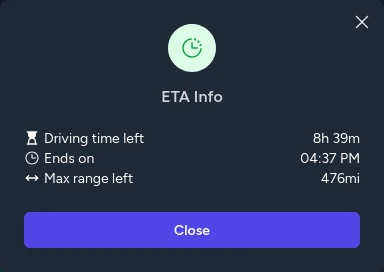
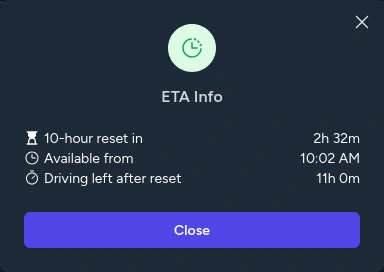
See estimated miles remaining, time until a 10-hour reset completes, the exact availability time, and driving hours after the reset.
Estimates support planning; actual availability depends on the driver's activity and applicable HOS rules.
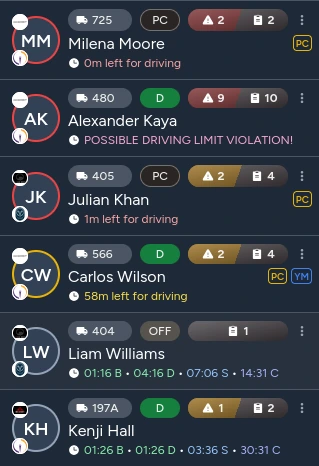
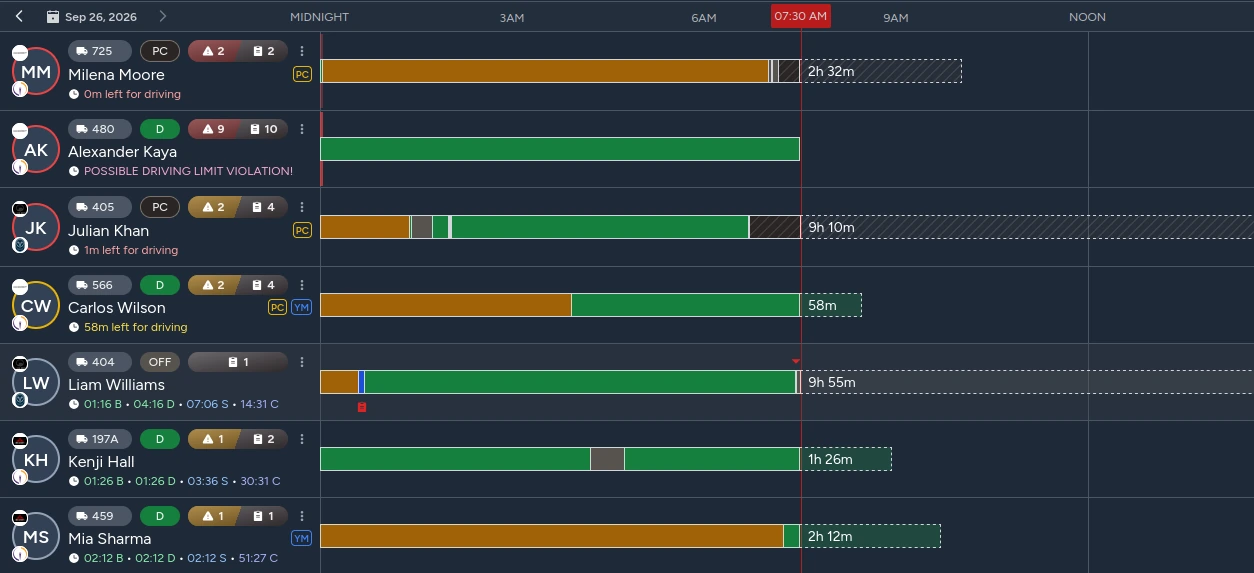
Julian is approaching the driving limit.
Carlos is in the yellow zone.
The rest of the fleet stays visible.
02 / Risk prioritization
The drivers who need attention rise to the top.
A large driver list becomes an actionable work queue. The monitoring team can focus on the closest HOS limits without manually searching through hundreds of drivers.
Less than 30 minutes
until an HOS limit.
Less than 1 hour
until an HOS limit.
Priority comes from the time remaining. Human review determines the next action.
03 / Log compliance
Catch log problems while they can still be corrected.
Are the driver's logs complete and compliant? Bring HOS violations, form-and-manner issues, and pre-trip inspection gaps into one review — for today and the previous 7 days.
Check whether a PTI was completed and whether it lasted at least 15 minutes. Flag the gap, review the context, and coordinate the appropriate correction.
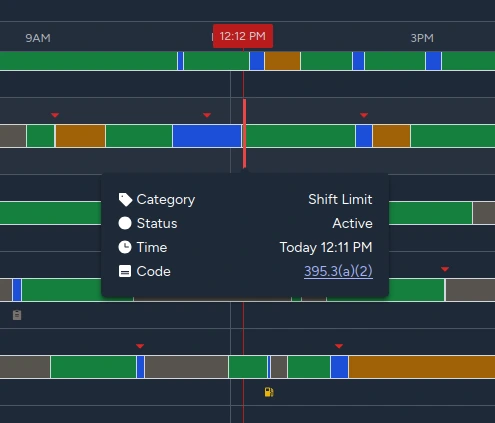
A focused log review
Illustrative compliance states
Form & manner
3 issues today /7 in the last 7 days
Certification, shipping documents, trailer IDPre-trip inspection
Completed · 17 min
Pre-trip inspection
Missing · Review
04 / Driving & vehicle anomalies
Detect activity that does not match the log.
Compare what the vehicle did with what the driver recorded. An exception starts a review; the surrounding activity helps explain it.
Unexpected movement
Illustrative dataThe odometer changes while the recorded status stays OFF Duty.
Check vehicle movement against OFF Duty or Sleeper Berth time.
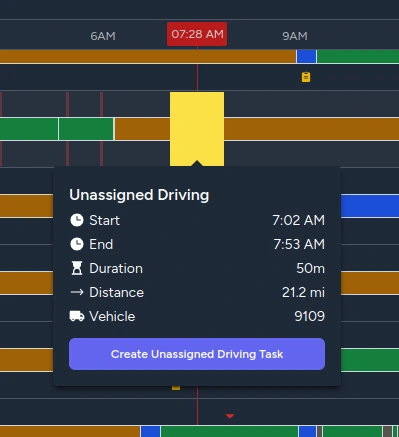
Driving with no assigned driver.
Track unassigned driving per vehicle, then show those events against the drivers who used that vehicle that day.
The product view shows a 50-minute event on vehicle 9109, with the context needed to start a review task.
Speed in context
Compare average speed with the applicable state limit.
Flag a difference for review. Illustrative data below.
- Observed average
- 72 mph
- State limit
- 65 mph
- Difference
- +7 mph
05 / Roadside & DOT activity
Know when roadside activity begins.
Any detected eRODS transfer creates a DOT inspection monitoring event, giving the monitoring team a signal to review promptly.
When a roadside interaction appears to be happening, your team has the driver, vehicle, and transfer time in view.
DOT inspection detected
eRODS transfer · possible roadside inspection activity
- Driver
- Marcus Reed
- Vehicle
- 4127
- Transfer detected
- 14:32
06 / Fuel intelligence
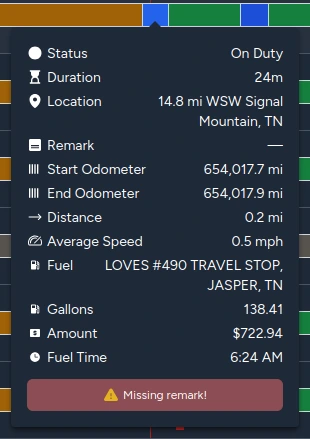
Compare fuel activity with the driver's log.
Live fuel-card transactions provide another operational signal. Match the transaction time to the driver's duty status and fuel remarks to identify what needs a closer look.
Illustrative comparison
Review the timing and recorded activity together.
07 / Movement intelligence
Reconstruct what happened on the road.
Logs show what was recorded. Our separate movement and POI inspector helps reconstruct likely movement and compare it with those records.

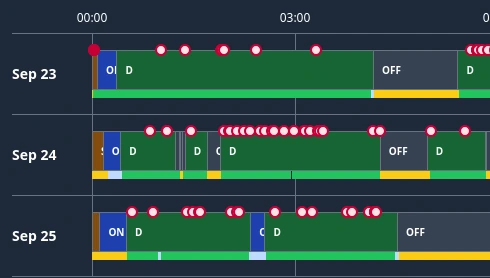
More context for the investigation.
Review detected passings near ALPR and Flock-style camera locations, weigh stations, weigh-in-motion sensors, and other known roadside sensors and points of interest.
Correlate signals to identify possible inconsistencies. Proximity to a known POI alone does not establish a driver's presence.
Illustrative review sequence
- Weigh station
- ALPR camera
- Weigh-in-motion
- Fuel stop
Recorded log · same time window
Compare the 09:02 and 09:47 signals with the recorded OFF Duty interval.
The monitoring operation
From raw data to an actionable monitoring queue.
Technology connects the signals and surfaces risk. People review the context, coordinate with drivers and fleet managers, and turn attention into action.
Monitoring engine
Data + detection + prioritization + human monitoring
- 01
Risk detection
Identify limits, exceptions, and possible inconsistencies.
- 02
Red / yellow prioritization
Bring the drivers closest to an HOS limit to the top.
- 03
Human review
Check the surrounding activity and decide what needs attention.
- 04
Driver / fleet action
Coordinate the next step before the situation escalates.
Technology that detects. People who act.
See what your fleet looks like when someone is actually watching it.
Connect the signals. Surface the risk. Give every issue a next step.