OmnitracsProvider course 3 of 4 · 12 min · 2 lessons

Omnitracs IVG: Day Log & ERODS

Read the IVG cab card’s annotated inspection and transfer screenshots.

LESSON 1 / 2 · Read an IVG day in Inspector mode

Read an IVG day in Inspector mode

Know which device and controls this walkthrough covers.

Day Log shows the record; ERODS sends it

On Omnitracs IVG, Day Log shows the day’s duty record. Inspector mode is for roadside viewing. ERODS is the separate file-transfer workflow. Have today and the prior seven days available for ordinary US review.

This guide uses the official IVG Rev. G cab card from November 2019. Check current IVG instructions with the carrier. Other products and older AOBRD cards may differ.

Use Day Log to show the requested day and its details.

Follow the card’s review controls
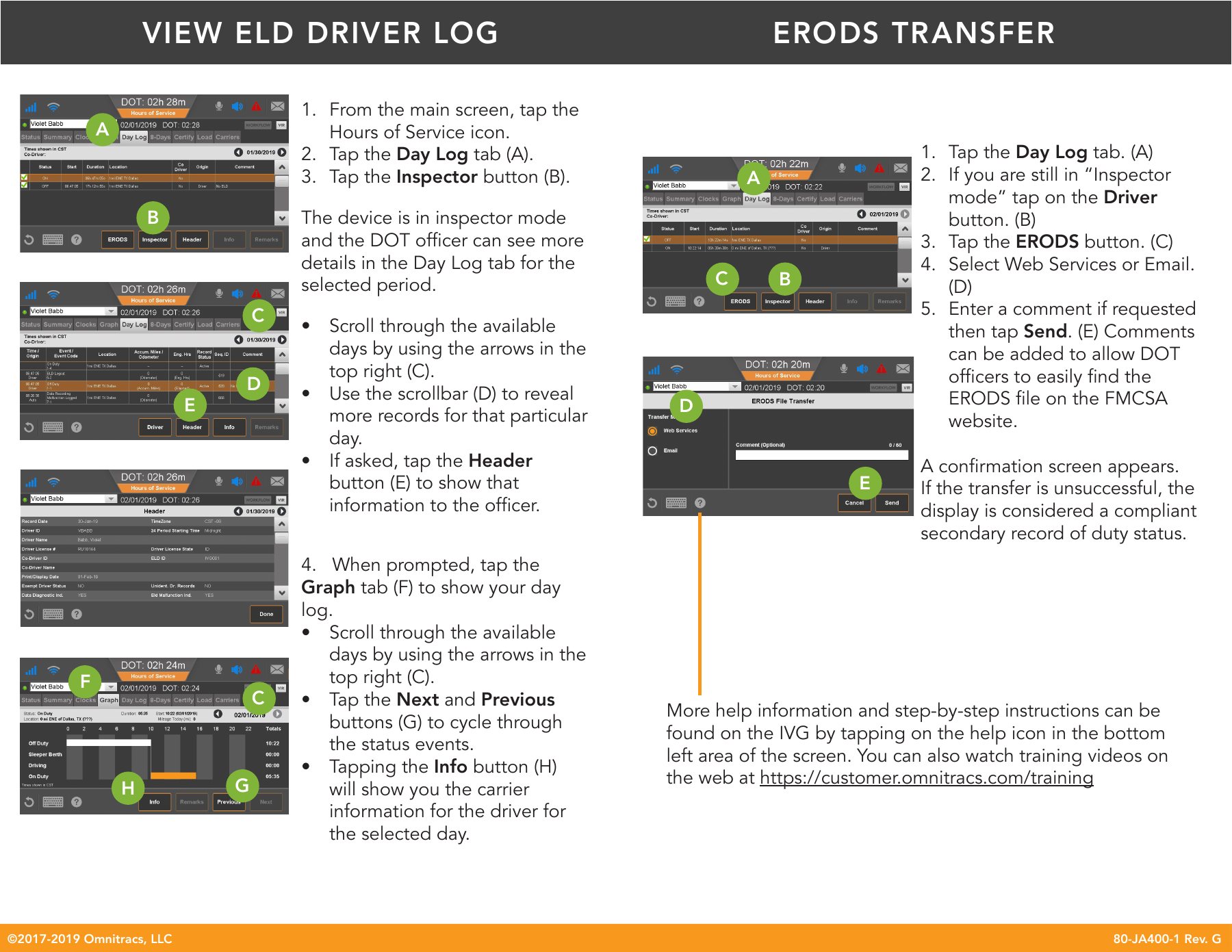
Official IVG ELD cab card with labeled Day Log, Inspector, Header, Graph, and ERODS controls
Left: review. Right: transfer. © Omnitracs, IVG Rev. G, November 2019. Enlarge to read the controls. Official source · Click image to enlarge.
  1. Open Hours of Service, then Day Log (A).
  2. Choose Inspector (B).
  3. Review dates and scroll through events.
  4. Show Header or Graph as requested.

Find one previous day

Practice opening yesterday’s header and graph. Then use the next lesson for file transfer.

Read the source

All courses

Scope: ordinary US interstate property-carrying operations unless specified. Teaching examples are illustrative. Review the linked current sources and carrier policy. Content reviewed October 4, 2026.

Book a demo

Demo video coming soon

We’re putting the finishing touches on it. In the meantime, book a live demo with our team or send us a message.

Contact us