Duty statuses: checking driving, work, and rest
Use the timeline to spot work recorded as rest and movement under the wrong category.
What a duty status records
A duty status labels a driver’s activity as driving, on-duty not driving, off duty, or sleeper berth. Driving is recorded automatically; the driver enters non-driving work and rest.
The labels affect how hours are counted. Compare them with the actual trip before relying on the displayed availability. Inspection, fueling, loading, and paperwork are on-duty not driving.
The driver selects non-driving statuses in the Samsara Driver App HOS workflow. As a reviewer, compare those entries with the trip, stops, and supporting records. The device cannot identify every task while parked.
Check what happened at each stop
Off-duty means the driver was released from work and responsibility. Sleeper berth means time actually spent in a qualifying berth. A parked truck alone does not establish either status.
Ask about unclear stops before proposing a correction. Confirm that driving belongs to the right person and truck.
Read the status and the movement category separately
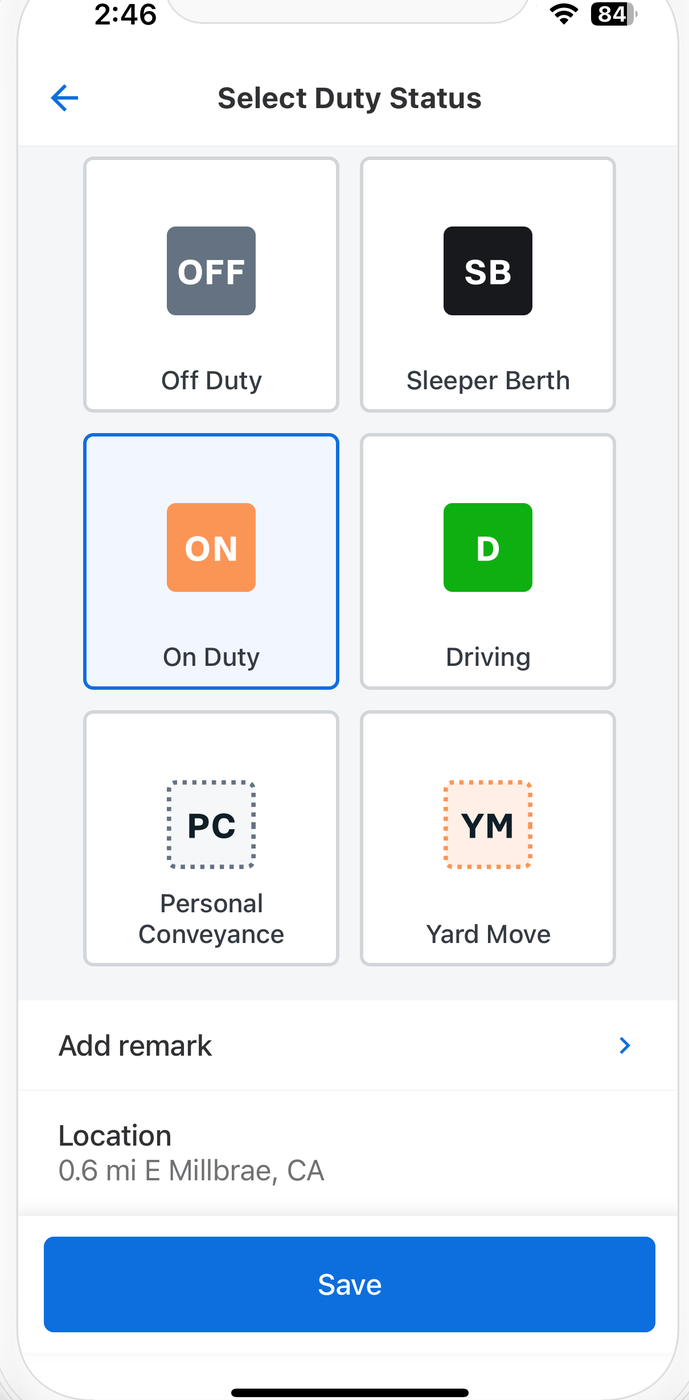
What to check on this screen
- On Duty is selected here. Check whether that matches the task the driver is doing.
- PC and YM are special movement categories. Their presence does not establish that a particular move qualifies.
What to watch for
Look for inspections or unloading recorded as off-duty, long work stops with no duty change, and PC or yard moves that do not match their purpose. A category label does not prove the activity qualified.
A simple review routine
- Compare work stops with duty changes.
- Check that special categories meet their conditions.
- Document the facts and use the permitted correction process.